KassaBet app: how to install it
Searching for a native kassabet app in the Apple App Store or Google Play Store will not turn up a KassaBet download. Instead of forcing players to download a heavy APK file or manage constant software updates, the platform operates as a progressive browser-based setup. This kassabet web app runs directly through your mobile browser and can be pinned to your phone or tablet screen in seconds. Once you place the shortcut on your display, it opens in full-screen view without address bars, behaving just like a traditional piece of software while taking up almost zero storage space on your handset. Below is the exact breakdown of how to set it up across different hardware.
| Device | Installation Steps | Final Result |
|---|---|---|
| iPhone and iPad | Open Safari > Tap Share icon > Select Add to Home Screen | Full-screen neon K icon on your iOS springboard |
| Android Phones and Tablets | Open Chrome > Tap three-dot menu > Select Add to Home screen | Direct launcher shortcut in your app drawer and home screen |
| Desktop and Laptop | Open Chrome, Safari, Edge, or Firefox > Bookmark the lobby | Instant browser access with full landscape studio filters |
Using the browser shortcut gives you complete access to the dark interface with its signature neon green and cyan highlights. You never have to worry about outdated versions blocking your login, as the browser automatically loads the newest games and cashier tools every time you tap the icon. If you switch phones, you simply log back in through your mobile browser without reinstalling gigabytes of slot data.
KassaBet mobile casino: what works on mobile
The kassabet mobile casino does not strip away features to fit onto a smaller screen. When you open the lobby on a smartphone, you get the exact same catalogue of over 3,000 games from more than 50 studios that desktop players see. This includes the entire KassaBet Select line of exclusives—such as Rolling Start USA, Slot of America, Coin Craze, Trophy Rush, ScoreX, and Piggy Banks Crack—all of which can be tested in demo mode before you risk real money. High-volatility hits from Pragmatic Play, Hacksaw Gaming, Nolimit City, and Push Gaming adjust automatically to portrait or landscape mode, keeping the spin buttons and bet selectors within easy thumb reach.
The live casino section also carries over intact, giving you more than 180 tables from Evolution, Pragmatic Play Live, Ezugi, and Playtech Live. Streaming Gravity Roulette, Blackjack Le Rouge, or Speed Baccarat on 4G or 5G connections runs smoothly, though older handsets may warm up during long video sessions.
Beyond the games, the entire account management system sits inside the bottom navigation bar. Opening the mobile cashier lets you deposit from €20 via Apple Pay, Trustly, Visa, Mastercard, Skrill, Neteller, or around €30 in Bitcoin, Ethereum, and Tether. Before confirming a payment, you can tick the opt-in box for the 100% up to €750 welcome bonus plus 100 free spins on Big Bass Vegas, or pick weekly deals like Neon Monday, Thursday Spins, and High Roller Saturday without ever needing a promo code.
Tracking your VIP progress from Green Chip up to Cercle Privé is equally straightforward on a phone screen. You can check your Tuesday wager-free cashback balance, monitor your points (earned at 1 point per €10 on slots or €50 on tables), and request payouts starting at €30 right up to your daily VIP limit of €3,000 to €15,000. Even document verification works better on kassabet mobile, since you can use your phone camera to snap your passport or ID card, a proof of address under three months old, and a live selfie. If you get stuck at any stage, tapping the corner bubble opens 24/7 live chat, connecting you first with the automated assistant Kassi and then with a human support agent.
KassaBet casino app: on iPhone via Safari
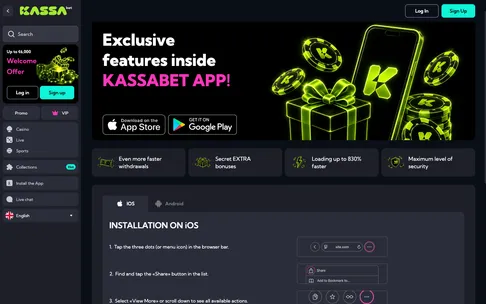
Setting up the kassabet casino app on an iPhone or iPad takes less than thirty seconds, provided you use Apple’s built-in Safari browser rather than third-party browsers like Chrome or Firefox on iOS, which sometimes hide the shortcut menu. Because there is no store download, you bypass Apple ID password prompts and storage warnings entirely.
- Open Safari on your iPhone and navigate to the main casino lobby.
- Look at the bottom toolbar of your screen and tap the Share button, which looks like a square with an upward-pointing arrow.
- Scroll down through the grey action list until you see the option labelled Add to Home Screen, marked with a plus sign inside a square.
- Tap that option, check that the title reads KassaBet, and press Add in the top right corner of the screen.
The neon K logo with its crown and diamond styling will immediately appear on your home screen alongside your other icons. When you tap it, the site launches in a dedicated window without the Safari search bar or bottom navigation arrows, giving more vertical space to slots like Gates of Olympus, Wanted Dead or a Wild, or the Grand Prix Neon tournament leaderboard.
One major perk for iPhone users is the integration of Apple Pay inside the cashier, allowing instant €20 deposits confirmed with Face ID or Touch ID. Just remember that Apple Pay only supports paying in; when you cash out winnings after the usual 4-hour internal check, you will need to route the withdrawal to your own bank account via Trustly or SEPA bank transfer. You can read our complete KassaBet review to see how the mobile version scored an 8.2 out of 10 in our editors’ test alongside the game and payout ratings. The slightly lower score compared to desktop comes down to dense studio filter menus on smaller iPhone Mini screens and the battery drain of live dealer streams.
KassaBet app: Android in three taps
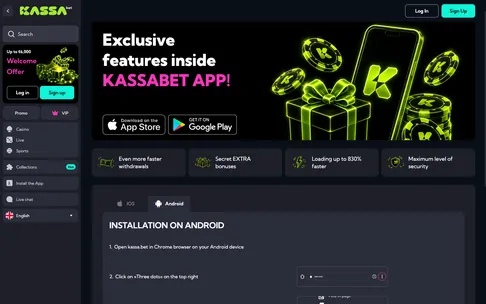
Android users get the fastest setup when using Google Chrome, which turns the site into a clean web package that sits neatly inside your app drawer. You do not need to enable unknown sources in your security settings or download any risky APK installers from random websites, because the kassabet app shortcut is handled natively by Chrome.
- Launch the Google Chrome browser on your Android smartphone or tablet and load the casino home page.
- Tap the three vertical dots in the upper right corner, right next to the address bar, to open the browser settings menu.
- Tap Add to Home screen (or Install app on newer Android versions) and confirm by tapping Add on the pop-up prompt.
Within a second or two, the icon is placed on your main screen. Tapping it opens the dark-themed lobby in full screen, giving you instant access to the 4 progressive jackpot tiers—Mini K, Neon, Grand K, and Royal KassaBet—as well as your cashier and bonus settings.
If you open the three-dot menu and notice that the Add to Home screen option is missing or greyed out, there are three quick fixes. First, check that you are not browsing in an Incognito tab, as Chrome blocks home screen shortcuts while in private mode. Second, if you opened the site by tapping a link inside another program like Telegram or an email client, you are likely inside an in-app browser; tap the top corner menu and choose Open in Chrome to get the full menu back. Third, some Android skins from Samsung or Xiaomi lock the home screen layout by default to prevent accidental changes. If the icon does not appear after tapping Add, go into your phone Settings, open Home Screen preferences, and toggle off Lock Home Screen Layout before trying the three-tap process again.